
My Busy Book - Big fun for little hands!
Big fun for little hands!
A calm, ad-free busy book for ages 2 – 5: 15 no-fail games for colours, words, music and play — right in your browser, online or offline.
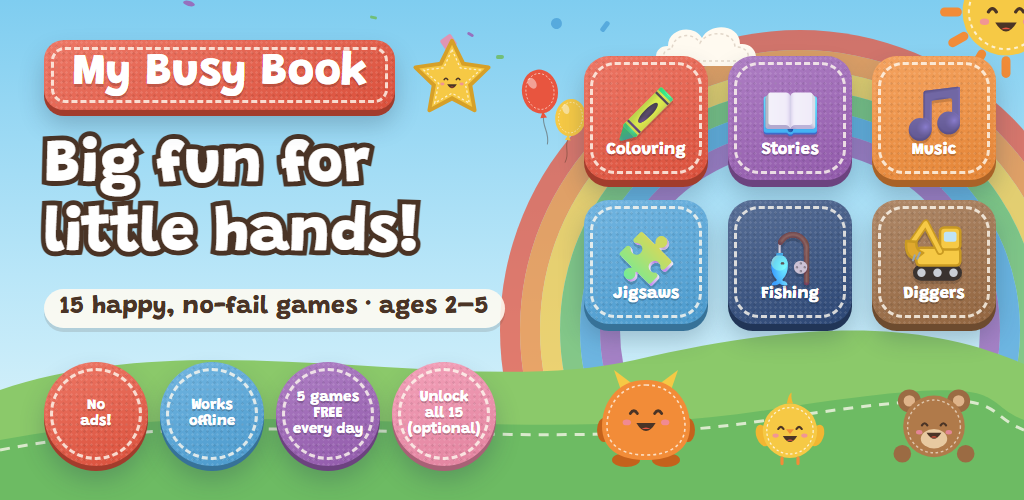
Big fun for little hands
My Busy Book is a digital busy book made for children aged 2 to 5. Big, friendly felt-style buttons open 15 simple activities that toddlers can play on their own: colouring pictures that come to life, jigsaws (even with your own family photos), interactive story books, first words and letters, colour sorting and mixing, fishing, balloon popping, bouncy balls, a music room, a digger and crane, a tractor farm, a car wash, a claw machine, marbles and matching pairs.
Why parents like it
- No wrong answers.
Every tap gets a cheerful reaction, never a “fail”. Children build confidence, hand–eye coordination and early skills like colours, counting, shapes and first words at their own pace. - Safe by design.
No ads, no links out, no accounts, nothing to buy by accident. Settings and purchases sit behind a simple grown-up check. - Private.
Your child’s progress and any photos you add for the jigsaws stay on your device — never uploaded. - Works offline.
Open it once online, then play anywhere — perfect for car journeys, flights and waiting rooms. - No reading needed.
Pictures and playful sound effects guide the way, so even pre-readers can play. - Multilingual.
English, German, French, Spanish, Italian and Dutch.
Free
- 5 of the 15 games, every day
- A different mix each day, so every game comes round
- No account, no ads, no time limit
Full version — €1.99, once
- All 15 games, every day, for good
- One code for up to 3 devices
- No subscription · secure checkout by Creem
Get started in seconds
- Open busybook.so-useful.com on any phone, tablet or computer.
- Add it to your home screen to use it like an app (see the FAQ below).
- Hand it over — the 5 free games of the day are ready to play.
Frequently asked questions
Getting started
What is My Busy Book?
A digital busy book for children aged 2 to 5. Big felt-style buttons open 15 simple, no-fail activities: colouring, jigsaws, interactive story books, first words and letters, colours, fishing, balloons, bouncy balls, a building site with a digger and crane, a tractor farm, a car wash, a claw machine, marbles, matching pairs and a music room. There are no wrong answers — every tap gets a happy reaction.
How do I start playing?
Open busybook.so-useful.com in your browser — that’s it. There is nothing to download and no account to create. For the best experience, add it to your home screen so it opens like an app (see “Can I install it like an app?” below).
Do I need an account, membership or subscription?
No. There are no accounts, no logins and no subscriptions. You can play the free games straight away, and the optional full version is a single one-time purchase.
Can my child play on their own?
Yes — that’s what it’s designed for. The games need no reading and have no failure states, so toddlers can tap and explore freely. Settings, photos and purchases sit behind a simple grown-up check (a quick sum), and there are no ads or links that lead out of the app. As with any screen time, we recommend a grown-up stays nearby.
Which languages are available?
English, German, French, Spanish, Italian and Dutch. The app picks your device’s language automatically, and you can switch it on the home screen or in the parent area. The games use pictures and sound effects rather than speech, so even pre-readers can play in any language.
Free and full version
What’s included for free?
Every day, 5 of the 15 games are free to play. The selection changes each day and rotates so that every game comes round regularly. Games that aren’t free today show a padlock — tapping one shows a friendly “locked today” message, never a shop.
What does the full version include?
All 15 games, every day, for good — including any new games or story books we add to My Busy Book later. It is a one-time purchase: no subscription and nothing to renew.
How much does it cost?
A one-time payment of €1.99. If you pay in another currency, your card or bank converts it at checkout at their exchange rate. The price shown at checkout is what you pay.
Do I have to buy the full version?
No, it’s completely optional. The free games stay free, and nothing stops working if you never buy.
Buying and license keys
How do I buy the full version?
In the app, tap ⚙ For parents, answer the grown-up check, open All games and tap Unlock all games. You can also buy from busybook.so-useful.com/license. Payment is handled securely by Creem.io.
Who handles my payment?
Creem.io is our Merchant of Record: they process the payment, handle VAT/sales tax and send your receipt. You can pay by card (Visa, Mastercard, American Express), Apple Pay or Google Pay — Creem shows the options available for your country and device. Your payment details go directly to Creem — we never see or store them.
What happens after I pay?
You come back to a thank-you page showing your license key (it looks like ABCD-EFGH-JKMN). Tap Open My Busy Book and unlock to unlock this device straight away. Please keep your license key — use Email this license key to myself or Copy license key on the thank-you page.
How many devices can I use my license key on?
Up to 3 devices — for example a phone, a tablet and a computer. On each one, open the parent area → All games and enter your license key.
I have a new phone or tablet — how do I move my license key?
On the old device, open the parent area → All games → Remove this device. That frees up one of the 3 places, so you can enter your license key on the new device. If the old device is lost or broken, don’t worry: a device that hasn’t been used for 60 days is freed automatically — or contact us and we’ll free it for you.
It says my license key is “already used on 3 devices”
Remove the license key from a device you no longer use (parent area → All games → Remove this device), wait until an unused device is freed automatically after 60 days, or contact us with your license key and we’ll help.
I lost my license key
Look for the email you sent yourself from the thank-you page, or contact us at info@so-useful.com with the order number from your Creem receipt and we’ll find your license key.
Can I get a refund?
Yes — contact us at info@so-useful.com within 14 days of your purchase, with your Creem order number. Once a purchase is refunded, its license key stops working and the devices using it return to the free games of the day.
Devices, offline play and storage
Which devices does it work on?
Phones, tablets and computers with an up-to-date web browser — for example Chrome, Safari, Edge, Firefox or Samsung Internet on Android, iPhone, iPad, Windows, Mac and Chromebook.
Can I install it like an app?
Yes. In Chrome or Edge, use Install in the browser menu (or the install icon in the address bar). On iPhone or iPad, open it in Safari, tap the Share button and choose Add to Home Screen. It then opens full screen like any other app.
Does it work offline?
Yes. Open it once while online and it’s ready to play without internet — ideal for car journeys, flights and waiting rooms. If you’ve bought the full version, the app quietly re-checks your license key when it’s online. A device that hasn’t been online for 30 days goes back to the free games of the day until it’s online again, then everything unlocks automatically. This never interrupts a game in progress.
Where is my child’s progress saved?
In your browser, on your device only — colouring pictures, prizes, settings and any jigsaw photos you add. Nothing is uploaded, so we can’t restore it for you.
What happens if I clear my browser data?
Clearing the site’s data (or using a private/incognito window) removes progress, photos and the unlock from that browser. Your license key still works: just enter it again. If all 3 device places are taken, remove an old device first (see above) or contact us.
Can I use my own photos for the jigsaws?
Yes. In the parent area, open Jigsaw photos and add pictures from your gallery or camera. They are resized and kept only on your device — never uploaded.
How do I turn the sound off?
Open the parent area and set Sound to Off. You can also make it full screen there.
Privacy and safety
Are there ads, in-app purchases or links for children to tap?
No ads, ever. The only purchase is the optional full version, and it can only be reached through the grown-up check. There are no links that take your child out of the app.
What data do you collect?
Very little, and nothing that identifies your child. When online, the app sends anonymous counts of how often each game is opened (just game names and numbers). If you buy the full version, it also sends your license key and a random device number to check the unlock — no name, email or device ID. Payment details are handled by Creem, not us. There are no cookies, accounts or tracking. See the Privacy Policy below for details.
Help
Something isn’t working or looks old
Close the app (or browser tab) completely and open it again — updates are applied when the app restarts, never in the middle of a game. If a problem continues, contact us.
Where do I report issues or send feedback?
Email us at info@so-useful.com — tell us your device and browser, and what happened. We read every message.
My Busy Book Terms & Conditions
Last updated: 07 Oct 2026By using My Busy Book, you agree to the following Terms & Conditions
...(Click here to read Terms & Conditions)
- 1. About these terms
These terms cover My Busy Book (the “app”), available at busybook.so-useful.com and provided by That’s SO Useful (so-useful.com, “we”, “us”). Contact: info@so-useful.com.
By using the app you agree to these terms. If you use the app for a child, you accept them on the child’s behalf as their parent or guardian. - 2. Who the app is for
The app is designed for children aged 2 to 5, to be used under the supervision of a parent or guardian.
Only adults (18 or older, or the age of majority where you live) may make a purchase or use the parent area. - 3. Free version
The app is free to use with 5 of its 15 games available each day; the selection of free games changes daily.
We may change which and how many games are free, or add, change or remove games, to improve the app. - 4. Full version (one-time purchase)
The full version unlocks all games for a one-time payment (currently €1.99). It is not a subscription and does not renew.
Your purchase gives you a personal, non-transferable licence to use the full version for your own household. Each license key works on up to 3 devices at a time; a device can be removed in the parent area, and devices not used for 60 days are released automatically.
You may not resell, publish or share your license key outside your household. We may deactivate license keys that are shared publicly, obtained fraudulently, or whose payment is refunded or charged back.
The full version includes any games and story books we add to My Busy Book in future, for as long as we provide the app. - 5. Payment
Payments are processed by Creem.io, which acts as Merchant of Record: Creem is the seller of record for your purchase, collects the payment, handles applicable taxes and issues your receipt. Creem’s own terms and privacy policy apply to the payment.
Prices are shown at checkout, including any applicable taxes. If you pay in a currency other than euros, your card provider or bank may convert the amount and charge fees. - 6. Refunds and cancellation
You can request a refund within 14 days of your purchase by contacting us with your Creem order number. Refunds are paid through Creem to your original payment method.
Once a purchase is refunded or charged back, its license key is deactivated and devices using it return to the free version.
This does not affect any rights you have under the consumer law of your country. - 7. Unlocking and online checks
Activating a license key needs an internet connection. While online, the app re-checks the unlock from time to time so that refunded or deactivated license keys can be recognised.
If a device has not been able to check its unlock for 30 days, it returns to the free games of the day until it is online again; the unlock is then restored automatically. This never interrupts a game in progress. - 8. Your data and content
Progress, settings and any photos you add are stored only in your browser on your device. We do not receive them and cannot recover them if they are deleted, for example when browser data is cleared.
Only add photos you have the right to use.
How we handle the small amount of data we do receive is explained in the Privacy Policy below. - 9. Fair use
You agree not to copy, modify, reverse-engineer or redistribute the app, not to work around the free-game limits or the unlock check, and not to interfere with our servers. - 10. Availability
We work to keep the app available and working well, including offline, but we cannot guarantee it will always be available, error-free or compatible with every device or browser.
If we ever stop providing the app, we will give reasonable notice on this page where possible. The app keeps working offline on devices where it is already installed and unlocked for as long as the browser keeps its data. - 11. Intellectual property
The app — its games, characters, artwork, stories, sounds and code — belongs to That’s SO Useful or its licensors (the Grandstander font is used under the SIL Open Font License). Your licence lets you use the app; it does not transfer any ownership. - 12. Liability
The app is provided “as is”. To the extent permitted by law, we are not liable for indirect or consequential losses, or for loss of data stored on your device.
Nothing in these terms limits liability that cannot be limited by law, or your statutory rights as a consumer. Our total liability for any claim relating to the app is limited to the amount you paid for it. - 13. Changes to these terms
We may update these terms from time to time. Changes are posted on this page with a new “last updated” date. Changes never take away a full version you have already bought. - 14. Contact
Questions, refunds or problems: info@so-useful.com.
My Busy Book Privacy Policy
Last updated: 07 Oct 2026My Busy Book is built to collect as little as possible. This policy explains what stays on your device, the little we receive, and your choices
...(Click here to read Privacy Policy)
- 1. Who we are
My Busy Book is provided by That’s SO Useful (so-useful.com). Contact: info@so-useful.com. - 2. What stays on your device
Progress (such as colouring pictures and prizes), settings (such as language and sound), any jigsaw photos you add, and — if you bought the full version — your license key and a random device number are stored in your browser on your device only.
We do not receive this data. You can delete it at any time by clearing the site’s data in your browser. - 3. What we receive
Game counts: when online, the app sends how many times each game was opened (game names and numbers only). Counts made offline are kept on the device and sent later, then removed from the device. We store only totals per game — not who played.
Unlock checks (full version only): to activate and re-check an unlock, the app sends your license key and a random device number generated for that purpose. We store, for each license key, which product it unlocks, the Creem checkout and order reference it was bought with, whether it has been revoked, and for each device number the date it was added and last checked.
We do not collect names, email addresses, device IDs, location, contacts or anything from your child. - 4. Payments
Purchases are handled by Creem.io as Merchant of Record. Creem collects the details needed to process your payment (for example your email address and card details) under its own privacy policy. We receive only the checkout and order reference needed to issue and manage your license key — never your card details. - 5. Cookies, ads and tracking
My Busy Book uses no cookies, no advertising and no analytics or tracking tools. - 6. Server logs
Our hosting provider may keep standard server logs, which can include technical details such as IP address and browser type, for security and operation, under its own policies. - 7. Children
The app is designed for young children and does not ask them for, or collect from them, any personal information. Purchases and settings sit behind a grown-up check. - 8. How long we keep data
Game totals are kept as anonymous statistics. Device numbers that have not checked in for 60 days are deleted automatically. License keys and their order references are kept for as long as we provide the app, so that your purchase keeps working and refunds can be handled. - 9. Your rights
Depending on where you live (for example under the GDPR), you can ask to access or delete the data linked to your license key. Contact us with your license key or Creem order number. Deleting a license key means it can no longer be used. - 10. Changes to this policy
We may update this policy from time to time. Changes are posted here with a new “last updated” date.